The following are required fields for the line items in your order:
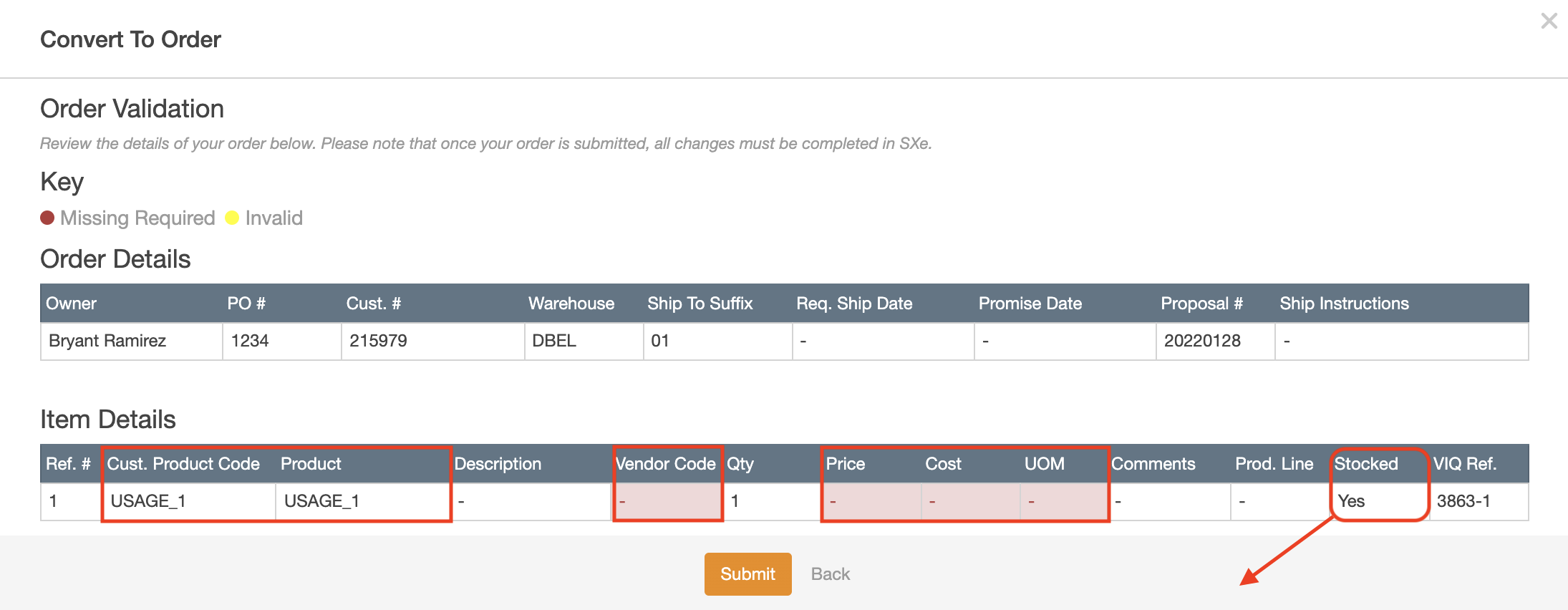
- Stocked: This is a parameter that is not a required field
- Price: The quoted price to the customer
- Product: This is populated with Vallen Part Number
- Customer Product Code: This is populated with Customer Part Number. It is only required when the product field is not populated. If the Product field is populated, the Customer Product Code is optional
- Vendor Code: This is populated by either the vendor code or manufacturer code specified for
your line items
○ If only a vendor code is available, the system will use the vendor code to populate this field
○ If only a manufacturer code is available, the system will use the manufacturer code to populate this field
○ If both manufacturer code and vendor code are available for line items, the system will use the vendor code to populate this field - Cost: The system will currently use the Replacement Cost associated with the Vallen Part
Number in your selected lines to populate this field. However, if the user updates the
Cost field in the Create & Update modal, the system will use this updated value in the
Convert to SX.e workflow - UOM: The system will use the unit of measure associated with the Vallen Part Number in
your selected lines to populate this field. However, similar to the Cost field above, if the
user updates the Base UM Code field in the Create & Update modal, the system will use
this updated value in the Convert to SX.e workflow
These remaining fields should be automatically populated by VallenIQ:
- Reference #: This field will display the reference # of the selected line items
- Description: This field will display the description associated with your selected line
items. If the line item is a valid Vallen Part Number, the system will pull the description
associated with this record and show it in this field. If the line item contains an updated or
new part, VallenIQ will display an updated description in the Create & Update modal - Quantity: VallenIQ will currently always use Requested Quantity 1 to populate this field.
In the next release, users will have the ability to select the Requested Quantity break
they’d like to use for each line item when submitting orders - Comments: This field will display Internal Comments if they are added to line items
- Product Line: VallenIQ will currently always use Product Line Code 1 to populate this
field. In the next release, users will have the ability to choose which product line code
they’d like to use for their line items in the Create & Update modal - VIQ Reference: This field will be automatically populated by the system. This reference
number will be the VallenIQ Project ID and Ref # separated by a dash (eg. 2960-14) - Proposal # (Order Details section): This field will be automatically populated by the
system. Proposal # will be today’s date in the following format: YYYYMMDD